What Is a Digital Twin? Definition, How It Works, and Examples
Digital twins are everywhere in Industry 4.0 discussions, yet the definition remains vague. In this article, you'll learn what a digital twin really is, how it's built, what levels exist, and how it's used day to day on industrial sites.
Digital twin: a simple definition
A digital twin is an accurate virtual representation of an object, a machine, a process or an entire industrial site. It lets you see, understand and work with a facility without physically intervening on it.
A digital twin is not just a static 3D model. It is linked to the reality of its physical counterpart: its configuration, equipment, flows, documentation and, in some cases, its real-time data. This link with the field is what makes it a working tool rather than just a picture.
In industry, there are three main types of digital twin:
-
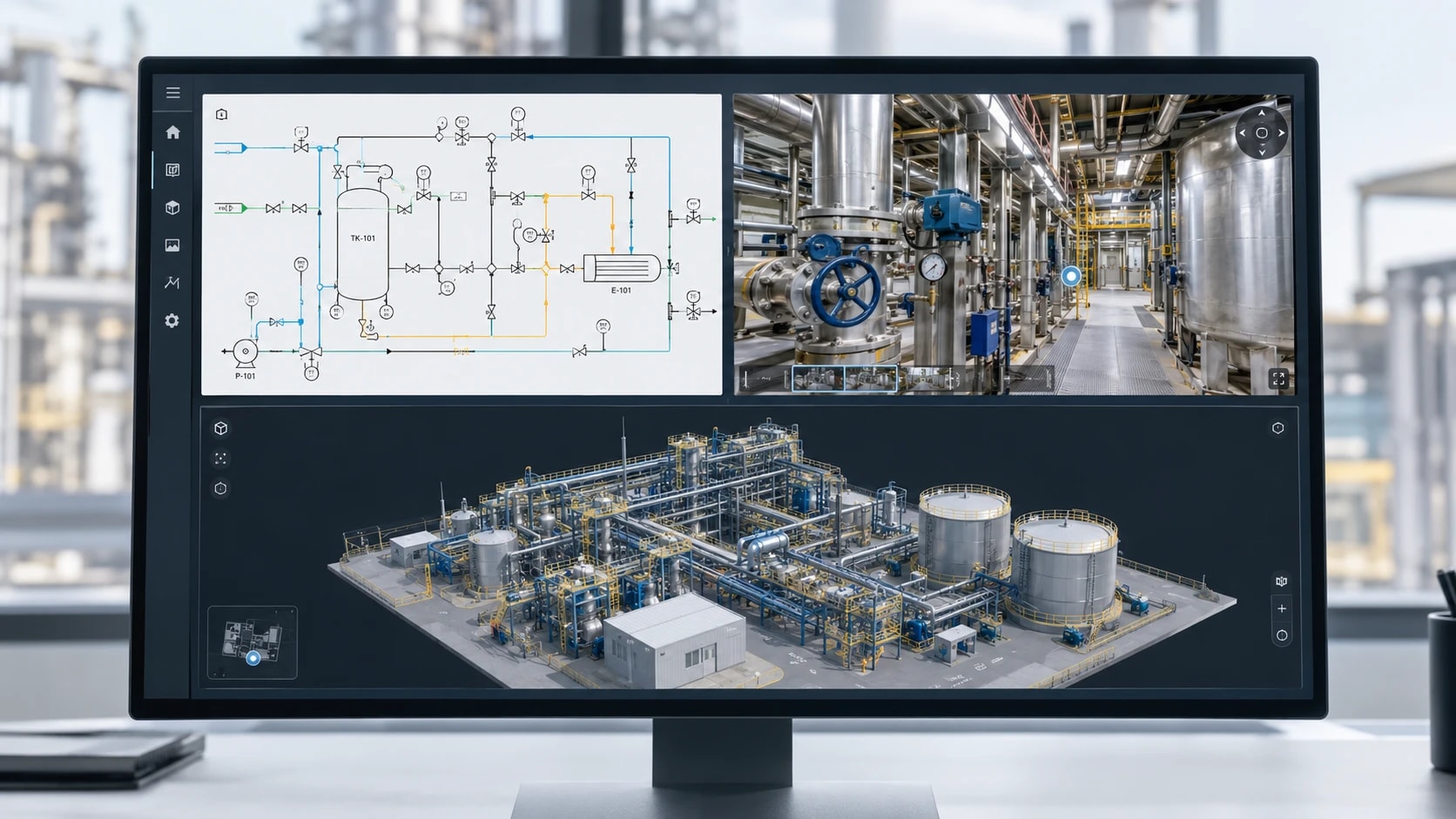
The operational twin: 360° views of the site, process diagrams (P&IDs) and a 3D model, all linked together. It is used to train teams, prepare interventions and share know-how.
-
The simulation twin: it reproduces how the plant operates using physical or mathematical models. It is used to test different operating modes, throughput rates or settings in order to optimize production without putting the real facility at risk. This is often the type people have in mind when they talk about digital twins.
-
The connected twin: it continuously receives sensor data (IoT) to monitor the condition of the facility in near real time and anticipate failures.
These three types are not mutually exclusive. They meet different needs and can be combined. The operational twin is often the foundation, because it describes the facility as it actually is. Simulation and real-time data can then be layered on top.
Where does the digital twin concept come from?
The idea was born in the space industry. In 1970, during the Apollo 13 mission, NASA relied on ground-based simulators, replicas of the spacecraft's equipment, to test solutions before passing them on to the crew.
The concept was formalized in 2002 by Michael Grieves at the University of Michigan, in the context of Product Lifecycle Management (PLM). The term "digital twin" was then popularized by NASA in the early 2010s.
Since then, the digital twin has moved beyond aerospace into industry, construction and smart cities. With the falling cost of data capture (360° photography, 3D scanning), it is now within reach of industrial sites of all sizes.
How does a digital twin work?
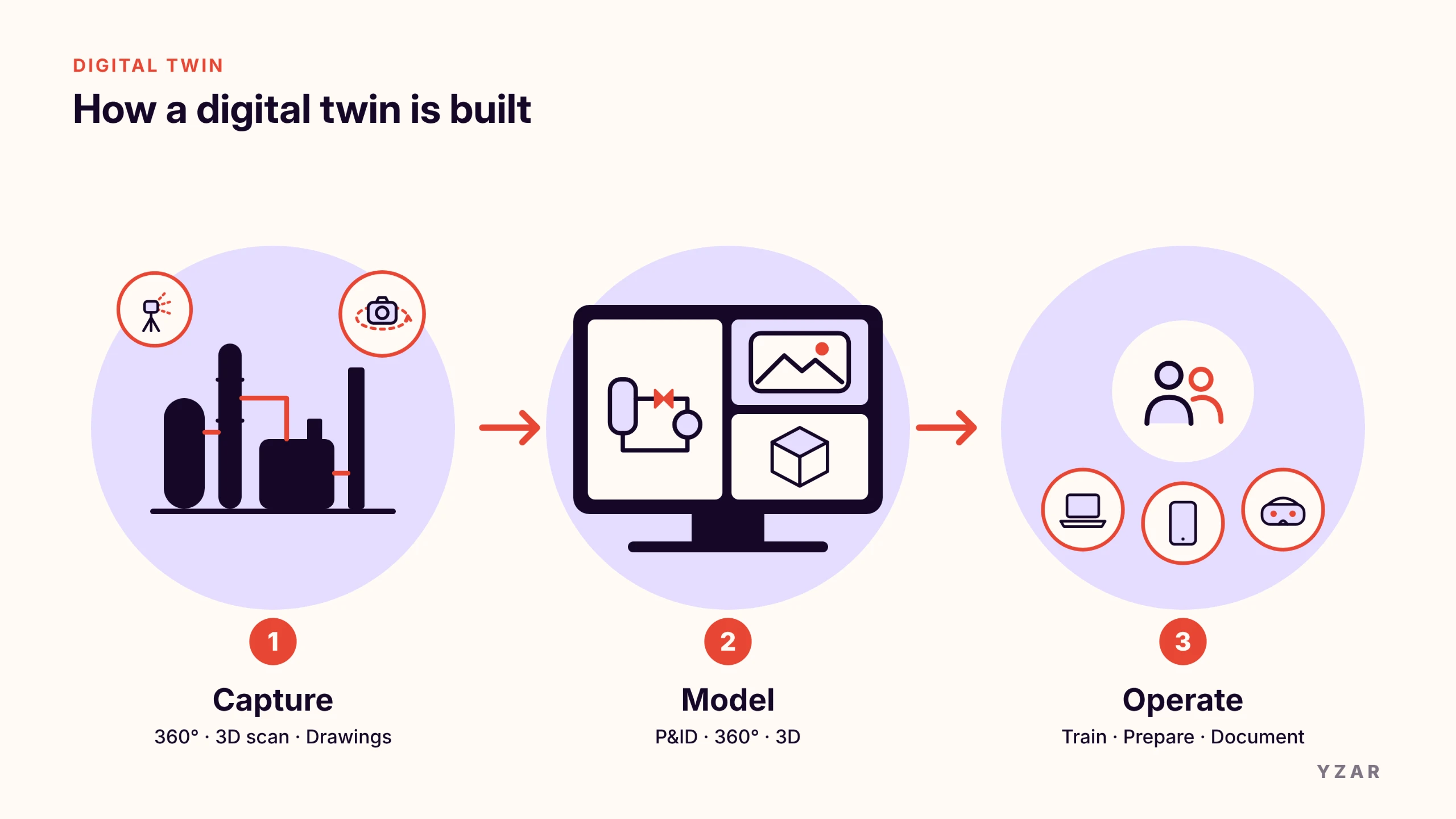
Building a digital twin relies on three successive building blocks.
-
Capturing reality. Everything that describes the facility is collected: 360° photos of the site, 3D scans, technical drawings (P&IDs, process diagrams) and equipment documentation.
-
Modeling. This data is brought together in a navigable digital environment. The most effective approach is to combine several complementary views: the diagram to understand the process, the photo to find your way around the site, and 3D to visualize equipment and flows.
-
Operation. The digital twin becomes an everyday working tool, accessed on a PC, tablet or VR headset. Teams use it to train, prepare an intervention, document a procedure or present a piece of equipment.
From this foundation, the twin can be enriched as needed. The best-known example is simulation. Models that reproduce the plant's physical behavior (reactions, flow rates, temperatures, throughput) are added to the twin. You can then test different operating modes and look for ways to optimize production.
It's a powerful use case, but a far more complex and costly one. It requires:
-
detailed process data;
-
models calibrated to the facility's actual behavior;
-
advanced engineering expertise;
-
continuous updating.
It is mainly justified for specific optimization goals. To train teams, prepare interventions or preserve know-how, an operational twin is enough, and it can be deployed much faster.
Digital twin, 3D model, simulation, BIM, CMMS: what's the difference?
These terms are often confused. Yet they refer to distinct tools, which can also complement one another.
-
A 3D model is a static visual representation. Once created, it no longer evolves with the site. It is used to visualize a project or a piece of equipment.
-
A 3D simulation reproduces a behavior, such as a flow or a movement, to test a scenario or size a system. As long as it remains generic, it is only a simulation. Once it is calibrated to the plant's actual characteristics, it becomes a simulation twin.
-
BIM (Building Information Modeling) is a data-rich digital model that comes from the construction sector. Very useful during the project phase, it is often abandoned once the facility is up and running.
-
A CMMS (Computerized Maintenance Management System) is maintenance management software. It schedules and tracks interventions but does not provide a visual representation of the site.
-
A digital twin is an accurate, usable replica of the site as it is, kept up to date with the facility. It is used to train, prepare, maintain and make decisions.
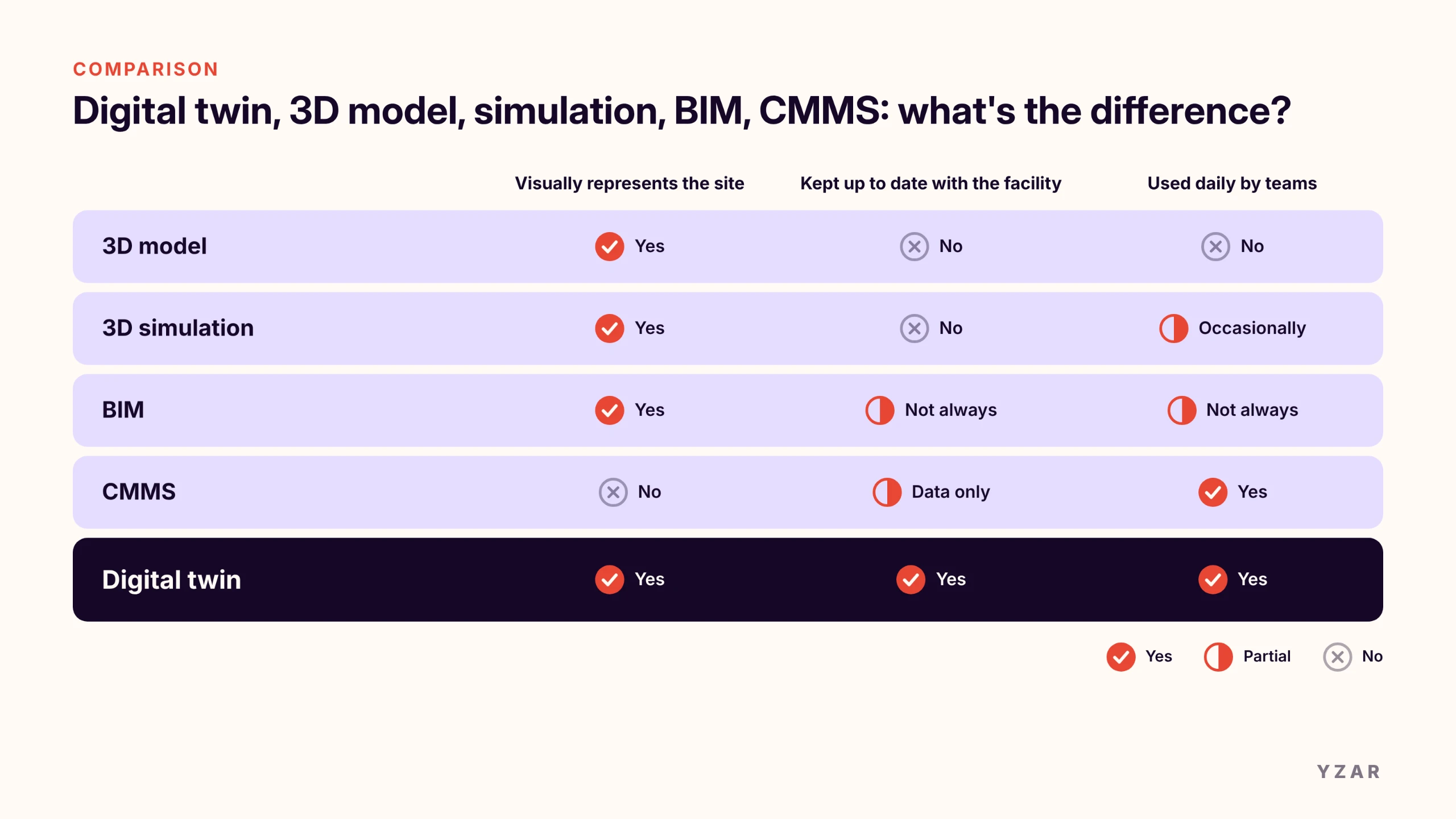
The key difference comes down to one question: does the tool represent the site as it is today, and do teams use it every day? If so, it's a digital twin. A twin can also build on an existing BIM model or link to CMMS records.
Examples of digital twins in industry
In aerospace and automotive, digital twins are mainly used to design complex products and monitor fleets of equipment (engines, robotic lines). In process industries such as chemicals, pyrotechnics, food and beverage, pharmaceuticals or building materials, the challenge is different: making complex, high-risk facilities understandable for the people who work in them. Here are four situations YZAR teams encounter in the field.
Training an operator without stopping production
At a Seveso-classified chemical unit, a new operator cannot learn by handling the facility. Training therefore relies on procedure binders and on-the-job mentoring, which is time-consuming and depends on the availability of experts.
With a digital twin, the operator walks through the unit in 360°, follows the path of a fluid on the P&ID and locates each valve in its real environment. They arrive on site already familiar with the layout.
Preparing a maintenance intervention remotely
Before a shutdown, maintenance teams and contractors need to know where to work, which access route to take and which equipment to lock out. Without visual support, this means site surveys at locations that are sometimes hard to access, and constant back-and-forth between drawings and the field.
The digital twin makes it possible to prepare the intervention from an office, potentially with several people from inside or outside the company: locating the equipment, checking its surroundings and flagging points of attention. Time spent in hazardous areas goes down, and so do location errors.
Replaying an incident that can't be reproduced
Some critical situations cannot be recreated for training: a leak, a fire outbreak, a cascading failure. At a pyrotechnics site, this is ruled out on principle.
The digital twin makes it possible to script these incidents and train teams in the right reflexes, in the exact setting of their own facility. They can safely learn the procedures to follow in an emergency.
Passing on know-how before an expert leaves
A technician who retires often takes years of unwritten knowledge with them: the order in which to open valves, the abnormal sound of a pump, the shortcut to reach a piece of equipment.
By documenting these practices directly in the digital twin, at the right spot in the facility, the company retains this knowledge and makes it available to new hires.
What benefits can you expect from a digital twin?
When well chosen and actually used, a digital twin delivers measurable gains. Among YZAR's customers, two figures stand out:
-
75% greater operator efficiency in the field, thanks to better knowledge of the facility before intervening, realistic training on the digital twin and shorter training time;
-
a return on investment in under 6 months, according to our customers' estimates.
These results come from several concrete levers:
-
Shorter, safer training: operators learn without risk and without tying up the facility.
-
Better-prepared interventions: fewer site surveys, fewer errors, less time spent in hazardous areas.
-
Retained know-how: experts' knowledge stays in the company after they leave.
-
Better risk prevention: emergency situations can be practiced regularly.
-
Easier communication: present a facility to an auditor, customer or contractor without bringing them on site.
The limits of a digital twin and how to avoid them
A digital twin is not a magic solution. Three pitfalls come up often.
-
An overly ambitious project from the start. Aiming for a complete predictive twin extends timelines and delays the first benefits. It's better to start with a specific use case, such as training on one unit, and then expand.
-
A tool that's too complex for the field. If only 3D engineers know how to use it, it won't be used. An operator should be able to get to grips with the interface in a few minutes.
-
A twin that becomes outdated. Facilities change: equipment gets replaced, lines get modified. Without regular updates, the twin loses its accuracy and the trust of the teams.
Before getting started, ask yourself three questions: What problem do you want to solve first? Who will use the tool day to day? How will it be kept up to date?
The operational digital twin for high-risk sites: the FILI approach
YZAR developed FILI to meet these field needs. Its guiding principle: a digital twin is only valuable if teams use it every day, not just when it's shown to the executive committee or in a demo.
FILI is built on three synchronized views:
-
the synoptic diagram (or P&ID), to understand the process and flows;
-
the immersive 360° view, built from photos of the site, to find your way around as if you were there;
-
3D modeling, to visualize equipment, flows and scenarios.
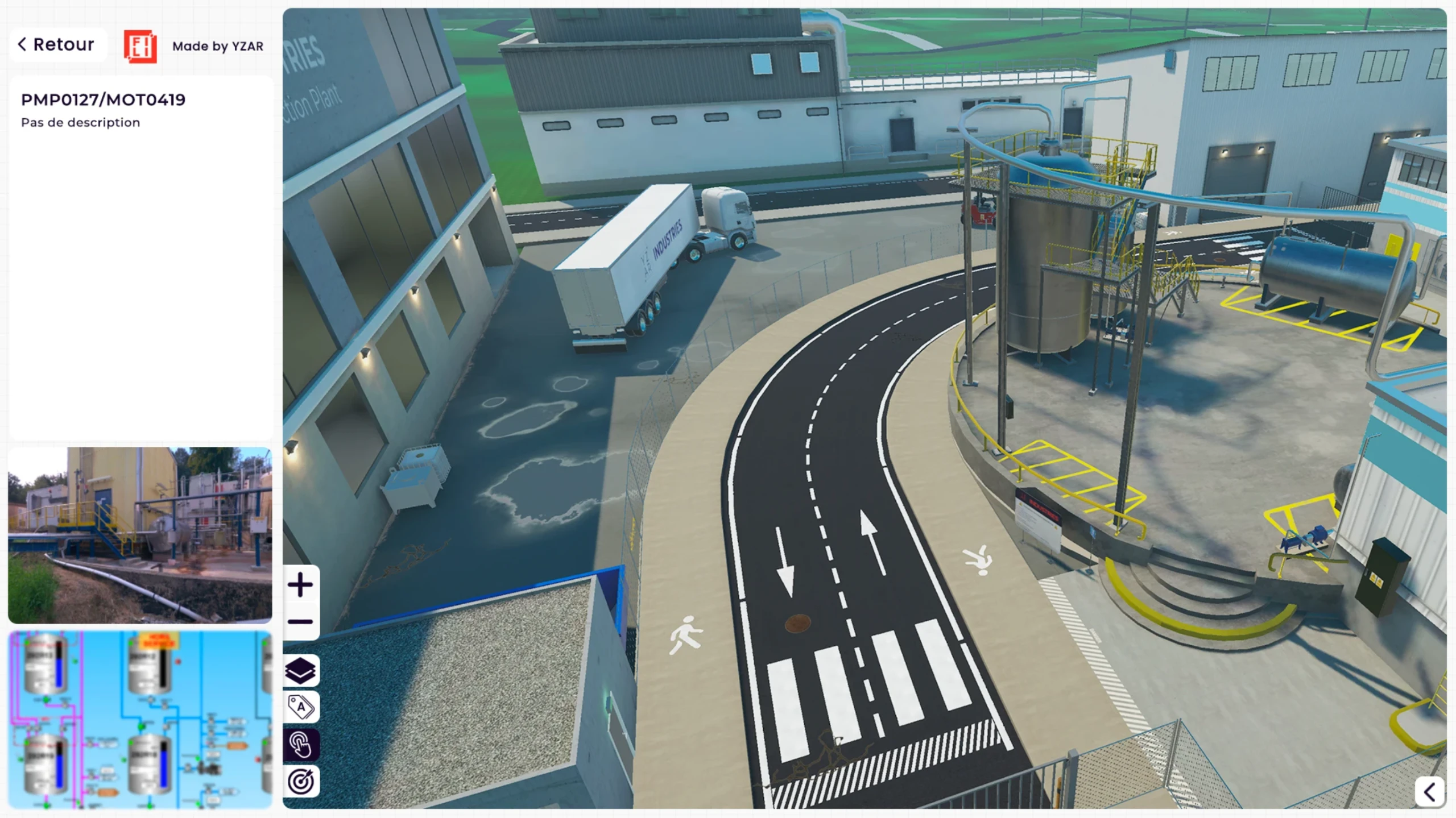
Operators can therefore view their environment through all three views at once. Clicking a valve in the P&ID or the synoptic diagram shows it in the 360° view and in 3D. By bringing these three dimensions together in a single, seamless interface, YZAR offers an immersive experience that transforms how industrial sites are understood.
FILI covers four key use cases: operator training, intervention preparation, maintenance structuring and risk prevention. The platform is designed for process industries with high operational constraints: chemicals, pyrotechnics, food and beverage, pharmaceuticals and building materials.
YZAR has full command of the technology, but that's not what makes the difference. FILI's real strength lies in how it's used: teams train on scenarios specific to their own site and facility, not in a generic environment. An operator rehearses the start-up procedure for their unit, a technician prepares the intervention on the pump they will actually have to lock out, a team works through the most likely incident on its line. It's this close-to-reality training that enables our customers to achieve a return on investment in under 6 months.
Digital twin FAQ
What's the difference between a digital twin and a 3D model?
A 3D model is like a photo: it shows the facility at a given moment and then stays frozen. A digital twin is more like an exact replica of the site that can be updated, and that you can move around in and even interact with. A 3D model is for looking; a digital twin is for acting.
Do you need IoT sensors to have a digital twin?
No. Sensors are needed to monitor the facility in real time or to carry out predictive maintenance. For training, intervention preparation or knowledge transfer, an operational twin based on 360° views, P&IDs and 3D is enough.
What's the difference between BIM and a digital twin?
BIM is an enriched digital model used mainly for design and construction. The digital twin takes over during operation: it represents the site as it runs today.
How long does it take to create a digital twin?
It depends on the target level, the size of the site and the documents provided. An operational digital twin is built from 3D scans, 360° photos and existing technical documentation. At YZAR, it can sometimes take just a few weeks to make the digital twin usable by operators: from 1 to 2 months for the fastest projects, and 4 to 7 months for more complex ones.
What is the return on investment of a digital twin?
It depends on the use case. Among YZAR's customers, ROI is estimated at under 6 months, driven in particular by operators who are 75% more efficient in the field.
From concept to field tool
A digital twin is not a tech gadget but a real lever for industrial performance. It's a working tool that brings the field closer to the teams who need it, to train, prepare an intervention or preserve know-how.
Want to see what an operational digital twin looks like on an industrial site? Discover FILI and request a demo.